cbx-to-pdf-windows-batch
CbxToPdf


Windows batch used to convert cbr or cbz file into pdf, with support for converting webp images.
Features
- Convert a cbr and a cbz file into PDF.
- Batch processing of one or multiple given folder. All cbx files in given folder are convert in PDF.
- Convert images (webp support) before Pdf generation.
- Handle of several levels of verbosity (–quiet, -v=normal, -vv=info or -vvv=debug)
- Set output folder, where all PDF are generated.
- Use a file config.ini to set binary dependencies, and configure the process of conversion according to the ImageMagick’s parameters.
Install
-
Get
./CbxToPdf.batandconfig.inifiles. -
CbxToPdf use 7-Zip to unpack archives cbx files. It also use ImageMagick to convert webp images in another format and finally generate PDF with converted images. To install this binary dependencies, you can use a package manager for Windows, like chocolatey.
> choco install 7zip imagemagick
- Notes, if you install these binaries in a different folder than the default, then you need to update the
config.inifile accordingly.
; ./config.ini
[BinaryDependencies]
ZIP_BIN="C:\Program Files\7-Zip\7z.exe"
IMAGE_MAGICK_BIN="C:\Program Files\ImageMagick-7.1.1-Q16-HDRI\magick.exe"
IMAGE_MAGICK_ARGUMENTS=-format png
- Check with
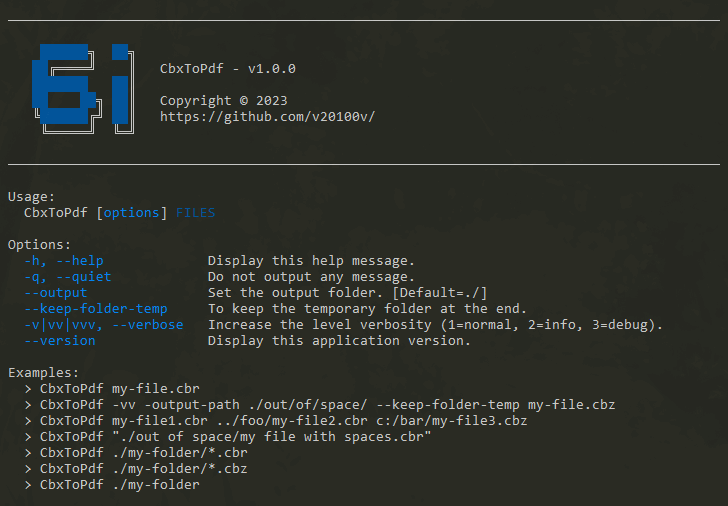
> CbxToPdf --help
Usages
Convert a single cbx file
Notes, if the given file have a blank space into this path, you need to put double quotes. The generated PDF is saved by default into ./output folder.
> CbxToPdf "./samples/file 1.cbr"

; Result
╔═════════════════════╗
║  1. Initialization  ║
╚═════════════════════╝
Ok, one cbx file was found to be converted.

╔════════════════════════╗
║  2. Convert cbx files  ║
╚════════════════════════╝
Launch conversion of the file: file 1.cbr
Ok, the file file 1.pdf was saved into D:\6i\CbxToPdf\output\

Job is done !
Convert multiple cbx file by given one ore multiple folder
You can give multiple relative path. The program search into these folders all cbr and cbz files. And you can filter the cbx file type by using the expression *.cbz into the path.
> CbxToPdf "./folder 1" "./folder 2" "../../folder 3/*.cbz"
Convert with no output (quiet)
Only errors are printed in console output.
> CbxToPdf --quiet "./samples"
Increase the level verbosity
Only errors are printed in console output.
# Normal output
> CbxToPdf -v "./samples"

# Info output
> CbxToPdf -vv "./samples"

# Debug output
> CbxToPdf -vvv "./samples"
Change the output folder
To generate PDF into another folder.
> CbxToPdf --output "../another-output-folder" "./samples"
Change options conversion images
Just open the config.ini file, and change parameters into IMAGE_MAGICK_ARGUMENTS. By default, it equals to IMAGE_MAGICK_ARGUMENTS=-format png and the process convert all images in png without change native resolution. For example if you want to use png format and resize all images just change to :
; ./config.ini
IMAGE_MAGICK_ARGUMENTS=-resize 1200x1850 -format png
About
Support
CbxToPdf is free and available as open source under the terms of the MIT License, but if you want to support me, you can buy me a coffee here !
Contributing
Bug reports, reports a typo in documentation, comments, pull-request & Github stars are always welcome !
Release
- CbxToPdf v1.1.0 - 2023.10.23
- CbxToPdf v1.0.0 - 2023.05.30
License
Release under MIT License. Copyright (c) 2023 by 2o1oo vb20100bv@gmail.com